



Software for monitoring and control of meat drying chambers
MGSOFT-V2
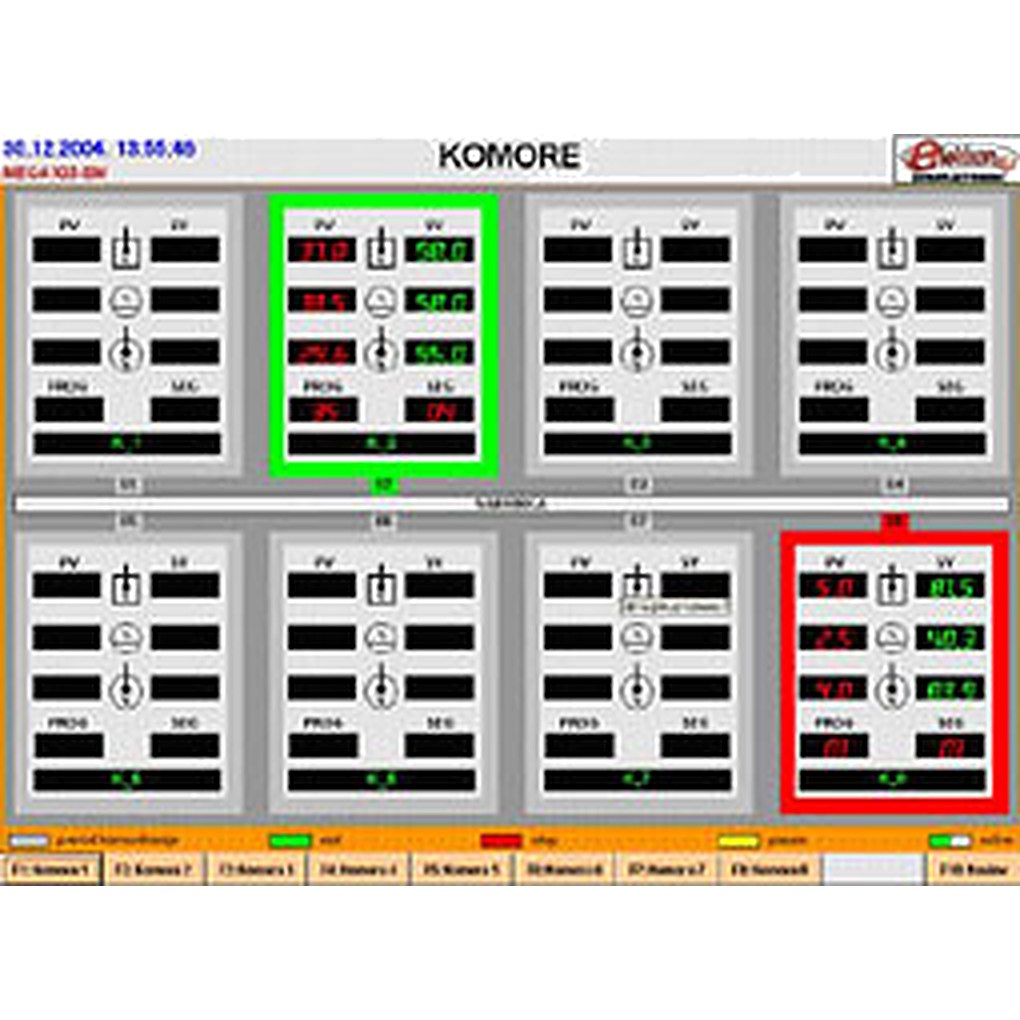
PC software with which you monitor and control the operation of chambers for drying meat and meat products. It controls 1 to 16 MEGA 103 devices from the computer.
- Monitoring of 1 to 16 chambers from one place
- Current values and setpoints for 8 chambers on one screen
- Programs of up to 10 segments and recipes, transfer between PC and chamber
- Temperature and humidity graphs for 5 days, archive on the PC disk
- Up to 32 alarms per chamber, archive of the last 500 alarms
- 5 user levels with passwords
Why MGSOFT-V2
- 01
All chambers on one screen
Temperature and humidity in the chamber, temperature in the product, segment, fan and output states for 8 chambers simultaneously.
- 02
Programs and recipes
You edit programs and recipes on the PC, download them to the selected chamber or save them from the chamber to the computer under a given name.
- 03
Record of every action
Every activity towards the chambers is archived with the date, time and name of the person who performed it. Access is divided into five user levels.
Description
MGSOFT-V2 is used for monitoring and controlling the operation of chambers for drying meat and meat products from a PC. It controls the operation of 1 to 16 MEGA 103 devices.
Current values and setpoints for eight chambers are shown on one screen. The current values are the temperature and humidity in the chamber, the temperature in the product, the segment duration, the program and segment being executed, the number of program passes, the next program, the fan speed and status, the output states and the process state (stop, run, pause, manual). For the current segment, the setpoint temperature and humidity in the chamber, the temperature in the product and the segment time are shown.
From the software you select the program and segment, start and pause the program and select manual or automatic operation. You can change the setpoints of the current segment even while it is running: the upper and lower temperature and humidity with hystereses, the core temperature and its delta, and one of seven fan speeds. During a program you can jump to any segment. The main commands are given with the keys F1 to F10 and Ctrl + F1 to F10.
The temperature and humidity in the chamber and the core temperature are shown graphically, in different colours, together with the state of all outputs for the last five days. Temperature and humidity are sampled every 30 seconds, and the output states every second. The y-axis range is adjustable from 0 to 150 °C (%), and the x-axis from 5 minutes to 8 hours. Values are read by moving the mouse, and the graph can be printed.
The main quantities in the chamber are archived automatically or manually, with sampling every 30 seconds. A closed archive is viewed on a graph with a range from 1 hour to 30 days. Archives can be printed by chamber, viewed, copied and deleted.
Programs and recipes are edited, copied and deleted on the PC. A program has up to 10 segments, and during editing the temperature, core temperature and humidity of each segment are shown graphically. A recipe is shown as a diagram with the operating modes and times of the individual outputs. Programs and recipes can be printed.
Each chamber has up to 32 alarms with a freely defined description. Two lists are kept: currently active alarms by chamber and the history of alarms appearing and clearing, with an archive of the last 500 alarms. The number of active alarms is always visible in a separate window.
All actions towards the chambers are archived with the date, time and the person who performed them, e.g. “27.12.2004. 19:10:25 Program 01 started at segment 01 Operator2”.
The system has five user levels: the first up to 10 users, the second to fourth 5 each, and the fifth one user. The fifth level manages names and passwords and can lock users. Automatic logout is adjustable from 1 to 60 minutes of inactivity.
The parameters define the chamber names, communication with the chambers, the printer, the logout time, the naming and copy location of archives, and manual or automatic start of archiving for each chamber.
Application examples
Help with selection
Describe your application and we will suggest a version and a catalogue number.
For an accurate reply, please state in your enquiry:
- 01The medium and its temperature
- 02Measuring range
- 03Output signal or power supply
- 04Type of mounting and connection